Play.Understand.Keep going.

Translate what’s on your screen. Privately. Locally. Instantly.

  • Grand Theft Auto VI
  • Marvel’s Wolverine
  • Red Dead Redemption 2
  • Resident Evil Veronica
  • Phantom Blade Zero
  • Call of Duty: Black Ops II
  • Final Fantasy VII Revelation

100+ games. Now in your language.

How it works

Select once. Subvoce does the rest.

Games, films, series or any video with subtitles: Subvoce works with all of them. No API keys, no extra setup. Subscribe, open the app and enjoy.

The bridge is out. We need another way.

Köprü yıkılmış. Başka bir yol bulmalıyız.

Live

It keeps up with the story.

Every new line is read and translated as it appears, while the game keeps running.

A game scene of an armed group walking toward a large mansion under the moon at night

Dutch: Kim lanet olası bir çocuğu kaçırır ki?

Dutch: Hemen buraya in!

OCR
186 ms
Translate
72 ms
Total
258 ms

Illustrative values

Your subtitles.Your machine.

Subvoce is designed around local processing. The words on your screen are read and translated on your own computer.

  • Subtitles are processed locally.
  • Translation doesn’t send subtitle text to a remote AI service.
  • Designed with privacy in mind.
  • Works offline once the required models are installed.

PC Mode

Right where you’re looking.

PC Mode places the translated subtitle directly on your screen, as a clean overlay above your game.

  1. Game
  2. Subvoce
  3. Translated subtitle

Ne olursa olsun, devam et.

Whatever happens, keep going.

Android TV Mode

From your PC to the big screen.

Subvoce can send translated subtitles to a compatible Android TV over your local network.
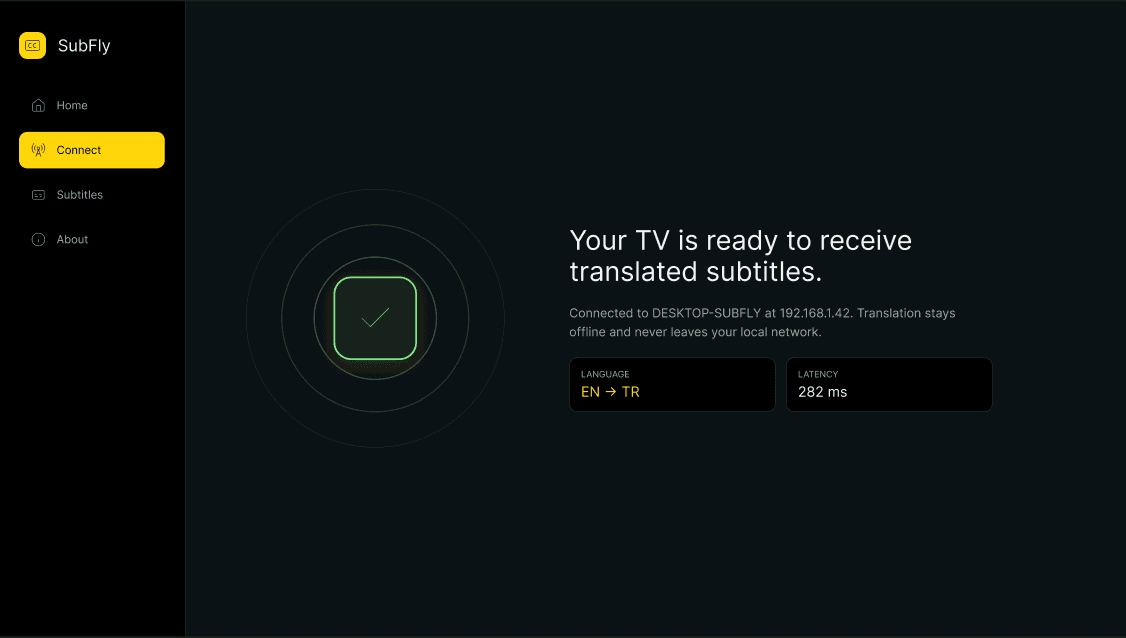
  1. Game / TV
  2. Subvoce
  3. Android TV

Playing on a console requires PS Remote Play or Xbox Remote Play on your PC.

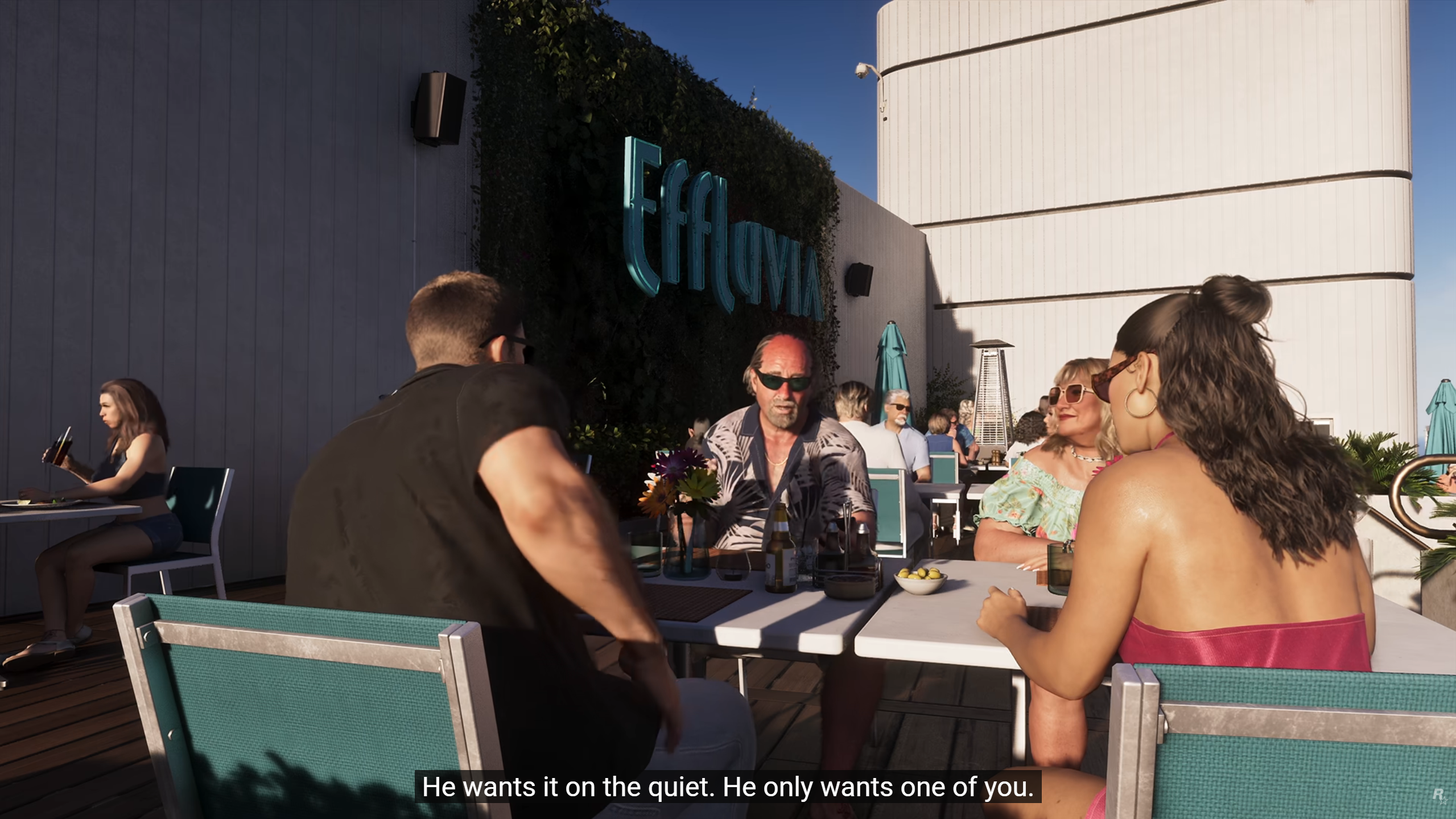
A game scene at a rooftop restaurant with an English subtitle on screen
The same scene on the TV with the subtitle translated by Subvoce

Bunu sessiz sedasız istiyor. Sadece birinizi istiyor.

Requires an Android TV device on the same local network as your PC.

Console Mode

PS5 and Xbox. In your language. On your TV.

  1. Your console on the TV, your PC beside it.
  2. Subvoce runs on your PC; the Subvoce TV app waits on your Android TV.
  3. Remote Play mirrors the game to your PC. Subvoce reads the subtitle and your TV shows the translation.
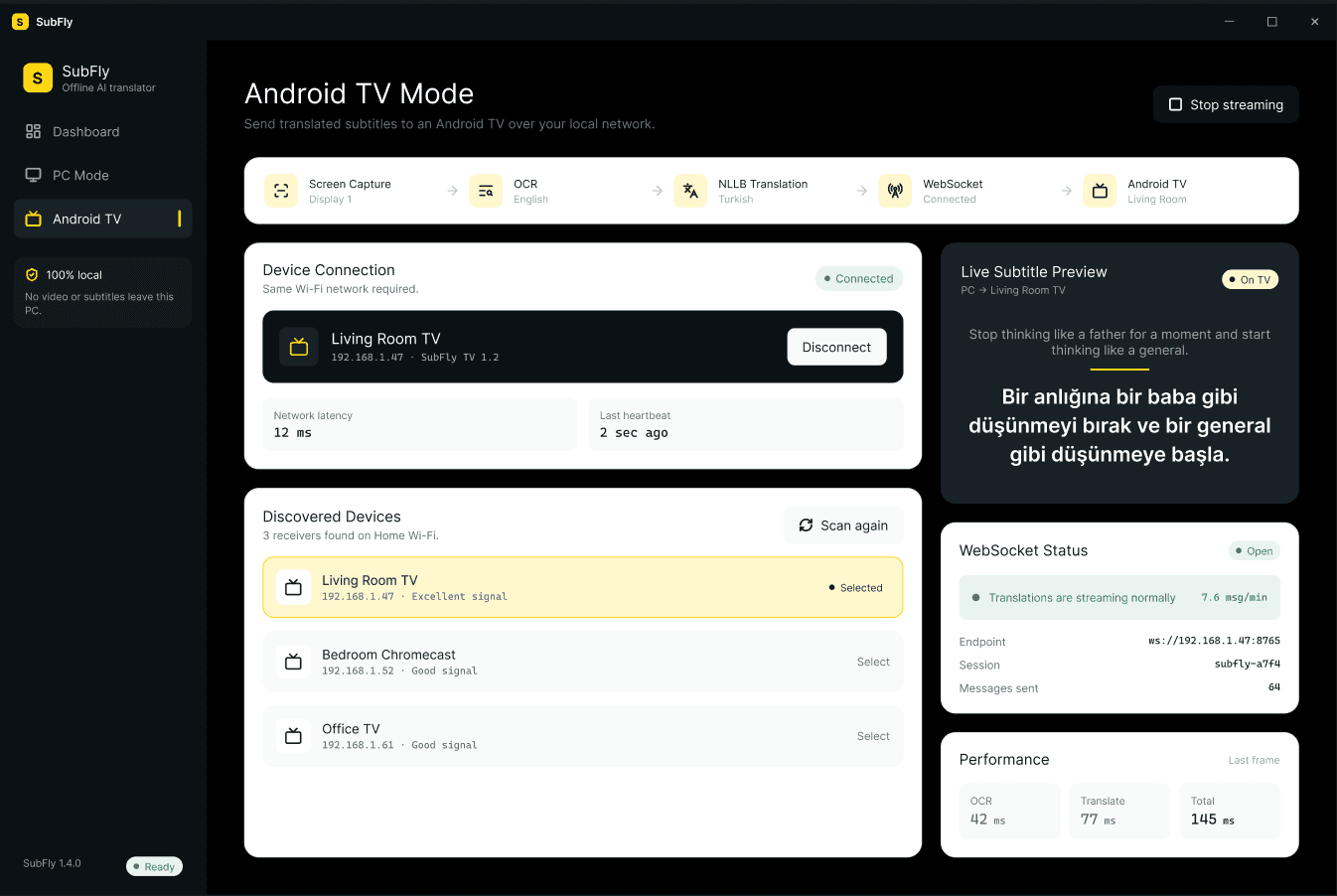
Subvoce on the PC in Android TV Mode, sending translated subtitles to the living room TV
Remote Play
A rider with a lantern on a snowy night, with an English subtitle on screen
PC
The Subvoce app on Android TV, connected and ready to receive translated subtitles

O iyi olacak. O çocuk için işler hep yolunda gider.

Android TV

Before. After.

Drag to compare the original subtitle with Subvoce’s translation.

A rider with a lantern on a snowy night, with an English subtitle on screenOriginalSubvoce

Requires PS Remote Play or the Xbox app on your PC and an Android TV on the same local network.
PlayStation, PS5 and Xbox are trademarks of their respective owners. Subvoce is not affiliated with Sony or Microsoft.

Fast enoughto disappear.

Subvoce is designed to keep translation quick enough to feel natural while you play. Actual timing depends on your hardware and the content on screen.

OCR
186 ms
Translation
72 ms
Total
258 ms

Illustrative values

Two screens. One flow.

PC

Subtitle overlay on your PC screen.

Android TV

Subtitle delivery to Android TV devices on your local network.

Plans

Simple plans.

Subscribe for as long as you need, or own it for good.

Subscriptions

Renews automatically until you cancel. via Polar

  • 1 Month


    TRY 149.99/ month

    • 1 month of unlimited access
    • 2 translation models
    • New updates
    • Unlimited text translation
    Subscribe
  • 3 Months


    TRY 449.99/ 3 months

    • 3 months of unlimited access
    • 2 translation models
    • New updates
    • Unlimited text translation
    Subscribe
  • 6 Months

    10% off

    TRY 899.99

    TRY 809.99/ 6 months

    • 6 months of unlimited access
    • 2 translation models
    • New updates
    • Unlimited text translation
    Subscribe
  • 12 Months

    10% off

    TRY 1,799.99

    TRY 1,619.99/ 12 months

    • 12 months of unlimited access
    • 2 translation models
    • New updates
    • Unlimited text translation
    Subscribe

Lifetime license

One payment. No renewals. via Polar

Lifetime

20% off

TRY 4,999

TRY 3,999.20one-time

  • Lifetime unlimited access
  • 2 translation models
  • New updates
  • Unlimited text translation
Buy Lifetime

Subscriptions and the Lifetime license are securely sold through Polar.

Checkout links will be live soon.

See the Subscription Terms and the Refund / Cancellation Policy before purchasing. Subscription Terms · Refund / Cancellation Policy

Payments

Why Polar?

We want the payment flow to be as clear as the product.

What does Polar do?
Polar is a platform for selling digital products and subscriptions. It runs the checkout, the recurring billing and the receipts for Subvoce subscriptions.
Who handles my card details?
You enter your payment details on Polar’s checkout page, not on the Subvoce website. Subvoce does not need to directly process or store your card information.
Why not build our own checkout?
A specialised payment platform gives you a standard, familiar checkout and a consistent way to manage your subscription, instead of a custom system built from scratch.
And the Lifetime license?
The Lifetime license is sold through Polar too. You pay once, with no renewals.

FAQ

Questions, answered.

What is Subvoce?

Subvoce is a desktop application that reads subtitles from your screen, translates them into your chosen language and shows the translation as an overlay on your PC or on a compatible Android TV.

How does Subvoce translate subtitles?

You select the area where subtitles appear. Subvoce watches that area, recognises new lines of text and translates them with an AI model running on your own computer.

Does Subvoce work offline?

Yes. Once the required models are installed, subtitle recognition and translation run locally without an internet connection. Activating or checking your license may require a connection.

Does Subvoce send my subtitle text to the cloud?

No. Subvoce is designed around local processing, and translation does not send your subtitle text to a remote AI service.

Which languages are supported?

Subvoce focuses on translating English subtitles. Turkish is the primary target language; the full list of available target languages is shown inside the app and may expand over time.

Can I use Subvoce with games?

Yes. Subvoce was built with games in mind. It works with on-screen subtitles in most games and videos, as long as the text is visible in the area you select.

Built for people who just want to play.

Subvoce started with a simple frustration: great games and stories, locked behind a language. We wanted to remove that barrier without turning it into a complicated setup.

Select the subtitle area, press start, and get back to playing. Everything else happens quietly on your own computer.

Our story

Need help?

Questions about Subvoce, your subscription or your license — write to us.

Subtitles.Understood.

We use necessary cookies to run this site. With your permission we may also use optional cookies. You can change your choice at any time. Cookie PolicyKVKK Notice